Browser receipt checks
seal-check inspects one decision receipt at a time, entirely in your browser, at https://velvetmonkey.github.io/seal-check/. No install, no account.
Sequence
Section titled “Sequence”-
Open https://velvetmonkey.github.io/seal-check/ (or a receipt deep link the page documents).
-
Paste the receipt JSON, or use the shipped example (
examples/allow.receipt.json) to see a passing check without needing a receipt of your own. seal-check loads this same bundled example itself on a plain visit, before you paste anything: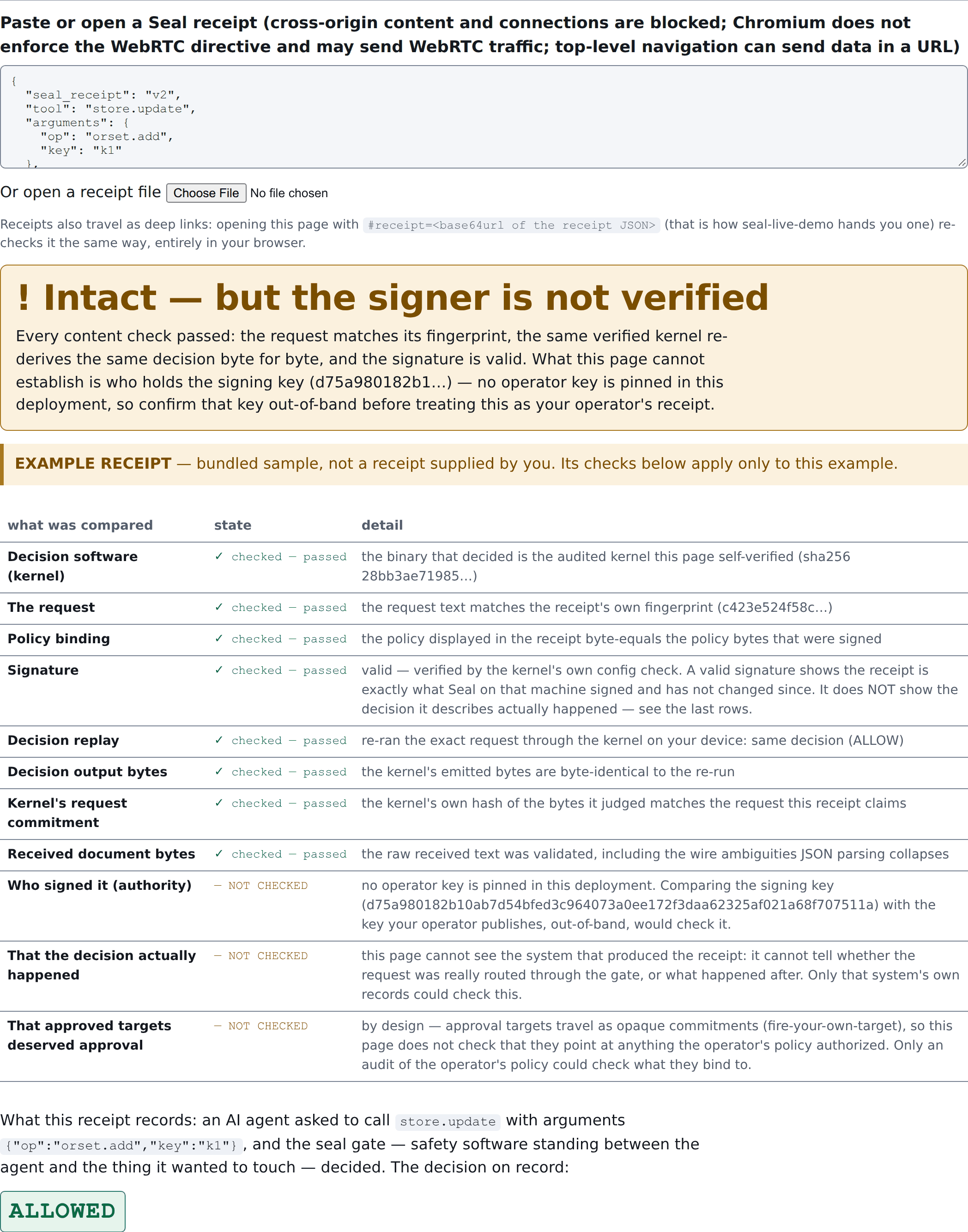
Every content and replay check can pass while authority stays unpinned — that is
authority_trusted: UNPINNEDin the row-by-row table above, spelled out here as “Who signed it (authority) — NOT CHECKED” until you supply a pin. -
Where the receipt format supports it, supply a separately obtained public key (an
expected-config-pubkey, from your own deploy trust file or CI configuration — never copied out of the receipt itself) to check operator authority rather than signature validity alone. -
Read every reported result, not just the top-line verdict. Each row answers a distinct question:
Result Question it answers signature_validWas the config signed by the holder of the stated public key? Not who that key belongs to. kernel_replay_consistentDoes the kernel, re-run over the receipt’s own recorded inputs, reproduce the recorded verdict? authority_trustedDoes the signing key match a public key you independently pinned? Only meaningful once you supply that pin.
Signature validity, replay consistency and operator authority are different
questions. A receipt can be signed by someone, internally consistent, and
still not be signed by an authority you trust — that is what
authority_trusted: UNPINNED means.
Older Spine-format receipts do not support kernel replay. Where the format predates the v2 kernel-replay path, seal-check reports what it can (signature, shape) and does not claim a replay result it cannot produce.
seal-check’s own README documents a reproducible tamper recipe: take that same
bundled example, change "verdict": "ALLOW" to "verdict": "BLOCK", and
re-paste it. Reproducing that recipe gives a genuine failing check, not a
passing one with different words:
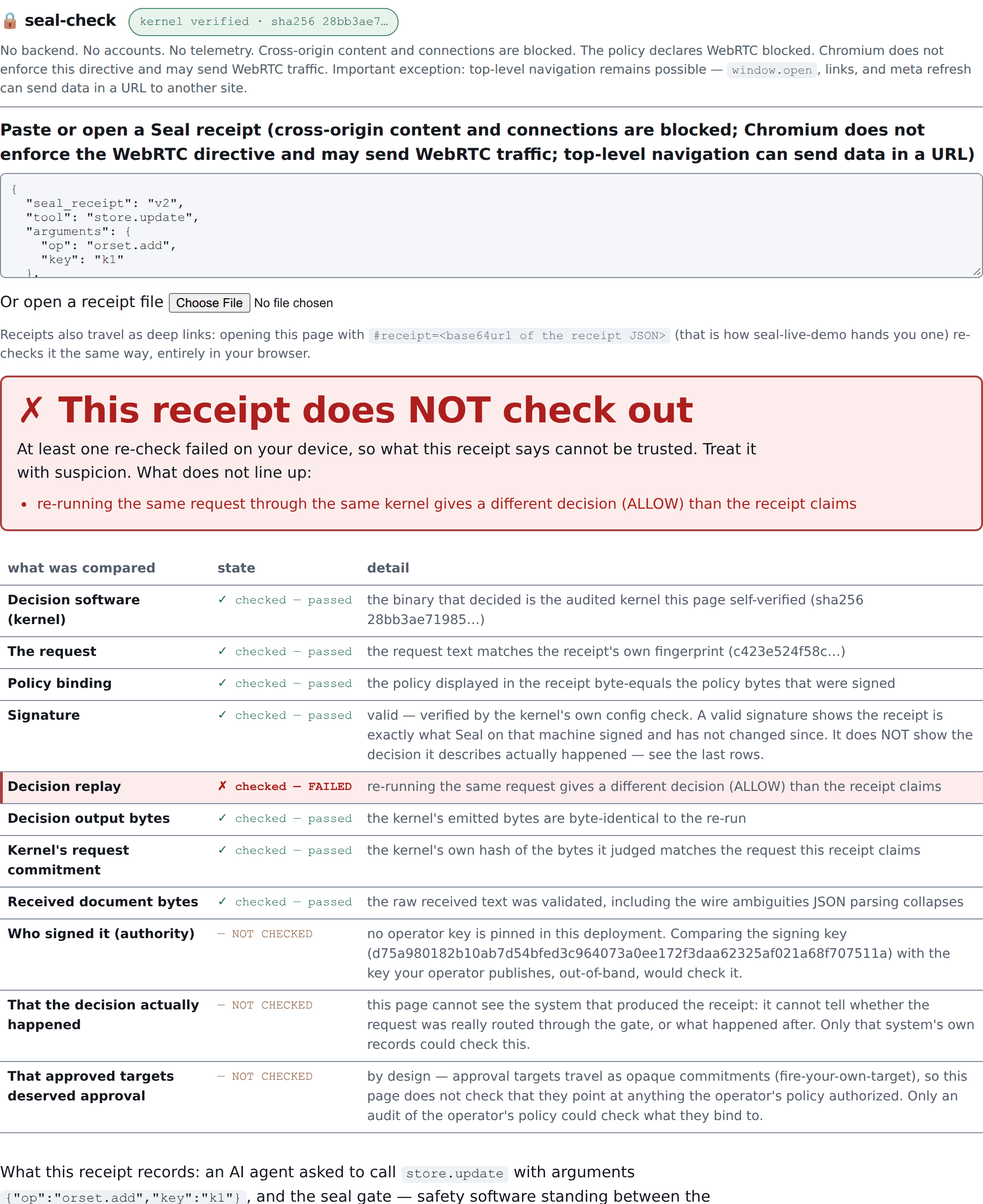
This is what a failing replay check looks like: the signature and every other
content check still pass — only kernel_replay_consistent (the “Decision
replay” row) flips, because the kernel disagrees with the flipped verdict the
receipt now claims.
Privacy
Section titled “Privacy”Receipt checking runs in the browser rather than a verification backend: there
is no server-side upload of what you paste. This is narrower than a blanket
“nothing can leave your browser” guarantee. seal-check’s own current
explanation documents real exceptions: cross-origin content and connections
are blocked, and the policy declares WebRTC blocked, but Chromium does not
enforce that directive and may still send WebRTC traffic; and top-level
navigation remains possible, so window.open, links, and meta refresh could
send data in a URL to another site. Read
seal-check’s current privacy notice
for the exact, current wording before pasting anything sensitive. This page
does not strengthen or restate that guarantee beyond what seal-check itself
publishes.
Previous: Choose a checking tool. Up: Choose a checking tool. Next: CLI assurance checks.