Choose a checking tool
Checking evidence is a different task from inspecting one receipt. Pick the route that matches what you are doing right now.
| I want to… | Use | Runs where |
|---|---|---|
| Inspect one receipt by hand | Browser receipt checks — seal-check | Your browser, no install |
| Run a repeatable receipt, coverage or conformance review | CLI assurance checks — seal-assurance-kit | Your terminal, Node.js |
| Verify a receipt from the product you already installed | seal verify PATH [--pubkey HEX], documented in CLI reference |
Your terminal, the seal binary you installed |
These are three separate executables. seal-check is a static browser page.
seal-assurance-kit ships its own seal command with subcommands such as
verify, scan, test and adequacy — a different program from the seal
CLI this repository ships, even though both are invoked as seal. This
repository’s own seal verify is documented alongside its other commands in
CLI reference, not in this section. Naming a command
seal does not mean it is the same executable; check which repository you
installed it from.
One receipt, or a broader review
Section titled “One receipt, or a broader review”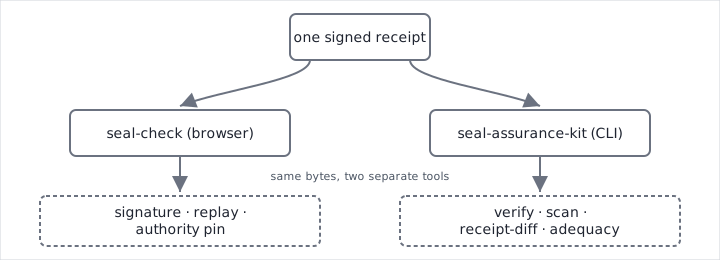
Opening seal-check and pasting a receipt answers “is this one receipt valid, replay-consistent, and whose authority is or is not pinned?” It says nothing about any other receipt, and nothing about policy coverage across your configuration.
Running seal-assurance-kit’s checks answers a wider question: across a corpus of receipts, tool definitions or policy, what is verified, what fails, and what could not be evaluated at all? That is a repeatable, scriptable review — suited to CI, not to a single pasted receipt.
Both tools share the same kernel and receipt-format dependencies as the product. Agreement between them can also reflect a shared defect in that common code, not independent confirmation. See Current guarantees and limits.
Previous: Current guarantees and limits. Up: Documentation map. Next: Browser receipt checks.